

Robot Vacuum Ran Over a Wet Spill? What to Check Before Restarting
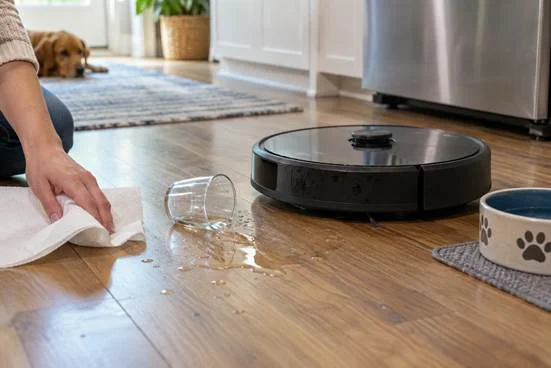
The robot reaches a tipped pet bowl before anyone notices the puddle. By the time you pause the run, its wheels have tracked water across the kitchen and the dock is only a few feet away. If your robot vacuum ran over a wet spill, do not send it back out to test whether it still works. Stop it, keep it away from the dock if anything is wet, and check the floor and accessible parts before deciding what comes next. The checklist below moves from the first safe actions to inspection and model-specific restart guidance.
Five checks before restarting a robot vacuum
Before restarting, work through these checks in order:
- Stop the run, keep the robot away from the dock, and note the liquid and where the robot traveled.
- Remove the spill and residue from the floor, including any wet rug, threshold, or seam in its path.
- With the robot off, inspect only the parts its manual lets you access and clean or dry them as directed.
- Check the dock and charging area for moisture, keeping an accidental spill separate from water in the designed mop system.
- Follow the model-specific restart instructions, then watch a short run on a clean, dry floor before restoring the schedule.
The sections below explain each check in more detail, starting with how to stop the robot and keep it clear of the wet area.
Stop the run and note what was spilled
Pause the robot in the app or with its controls, then switch it off as directed by its manual. If you can lift it without touching wet electrical parts, move it to a dry surface where it cannot roll back into the spill. Keep it off the charging contacts until you have checked both the robot and dock area. When liquid has reached an outlet, plug, or power cord, avoid handling that connection while it is wet and follow appropriate electrical safety guidance.
Look at the spill before cleaning it up. Plain water from a pet bowl is different from a sticky drink, milk, or a cleaning product. Note roughly where the robot traveled and whether it crossed a rug or returned to its base. This record helps you check the affected areas against the instructions for your model. If a cleaning solution was involved, note its name or photograph the label before discarding the container.
Clean the floor before restarting the robot
Absorb the liquid with towels or another suitable material, starting where the robot traveled. Check under nearby furniture and along thresholds where wheels may have carried droplets. Clean sticky residue according to the flooring maker’s instructions, then let the area dry. Do not use another robot pass to collect standing liquid. The robot can spread it farther, including toward carpet edges or the charging station.
Move a wet rug or mat out of the route if it needs separate cleaning. If the mess involved a pet bowl, place the bowl somewhere the robot will not revisit during the next run or use an available no-go setting around its usual location. The floor needs to be ready before you consider the machine. A dry surface also makes it easier to tell whether later moisture comes from the robot itself. Check floor seams for remaining moisture after the open surface looks dry, especially along the route the wheels took.
Inspect only the parts the manual allows you to access
With the robot off, look over the wheels, brushes, suction opening, mop assembly, dust container, and external sensors for dampness or residue. Remove a user-serviceable brush or container only if your model’s instructions show how. Sticky liquid may cling to a wheel tread or brush end, while a wet dust container or filter can affect later operation. Clean and dry removable parts using the method in the manual before reinstalling them.
Keep liquids and improvised drying methods away from openings and electronics. Do not open the sealed body, remove a battery, use a hair dryer, or put the robot on its dock as a drying test unless the model-specific instructions or support team tell you to do so. If moisture appears inside the housing, near charging contacts, or in a part you cannot access, leave the robot off and contact the manufacturer.
Check the dock and separate the robot from its mop system
A robot that returned to its station after crossing a spill may have carried liquid onto the dock tray or charging area. Inspect the station from the outside. If the station or its power connection is wet, do not use it until the manufacturer’s guidance says it is safe. Wipe accessible surfaces only as instructed, and check removable trays or tanks according to the manual. Water in the clean or dirty water tanks belongs to the designed mop system. Spilled liquid around the station is a different issue. If the dock rests on a mat, check beneath that mat once the area is safe to handle because liquid can remain hidden there.
The distinction matters for combination machines. A wet-dry robot vacuum may have a mopping system that applies and collects its own cleaning water, but that does not automatically make the vacuum intake suitable for a tipped cup or a puddle. Some models also have a separate handheld or portable cleaner with different operating rules. Use the instructions for the exact component involved, especially if the robot crossed juice, milk, or another substance outside the approved cleaning solution.
Use the model’s restart guidance, then watch a short run
Check the manual for drying, reassembly, and restart steps before charging or running the robot again. Look for warnings in the app, unusual sounds, damp exhaust, residue in the dust path, or repeated trouble at the dock. If any of those appear, stop the test rather than repeat a full cleaning cycle. A short supervised run on a clean, dry area is a better check after the instructions have been met than immediately restoring a schedule. Pause any automatic cleaning schedule until you have reviewed the supervised test run.
Before restoring a schedule, compare the short test with normal operation: does the robot move freely, sound familiar, and return to a dry dock without a new warning? Keep it off if the model instructions do not allow a restart or if a new problem appears. Record any issues so you can reference the guidance at the end of this article
How the eufy Robot Vacuum Omni E28 helps prevent a repeat spill
After the spill has been handled and the robot is cleared for routine use, the eufy Robot Vacuum Omni E28 can keep its mapped route away from a pet water station that stays in one place. Draw a no-go zone around the bowls and mat, then watch a run to see whether the boundary gives them enough room. This reduces the chance of the robot entering that fixed area; a bowl moved elsewhere still needs a floor check.
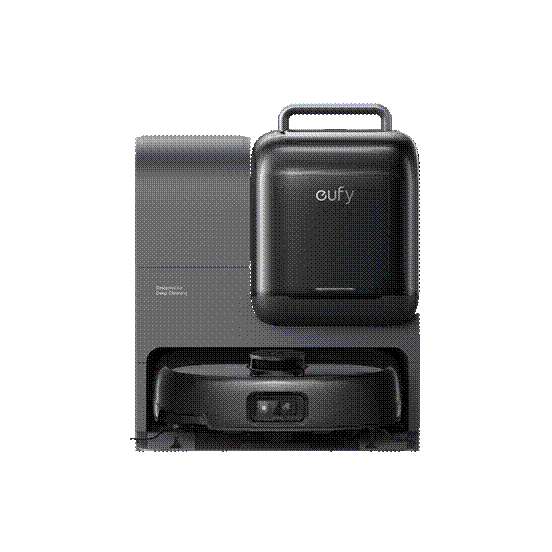
The E28’s self-cleaning roller mop uses its designed water system for routine mopping, and its portable deep cleaner is a separate component. Neither feature means the robot’s vacuum intake should collect a puddle. Once its model-specific restart instructions have been met, a short supervised run on a dry floor can test the revised route. For a comparison of current floor cleaning solutions, eufy showcases its full lineup of robot vacuums and mops.
If the floor is dry, the accessible parts and charging contacts show no moisture, and your model’s instructions permit a restart, reassemble it as directed and watch a short run on a dry area before restoring the schedule.
If liquid may have entered an inaccessible part or a powered connection, or the robot shows a new warning, sound, leak, or dock problem, keep it off and contact support. Provide the exact model, the liquid involved, where the robot traveled, whether it reached the dock, the warning details, and photos of visible residue. Those details give the support team a clearer basis for the next step.